Tronadian Web Hosting logo Tronadian Tronadian Web Hosting logo Tronadian
News:
Automatic Daily Backups New Feature - SiteJet Builder
CAD
  • CAD
  • USD
  • 0
    Account
    ExtendReduce
    Home
    Domains
    Register a New Domain Transfer a Domain My Domains
    Store
    Browse All ----- Shared Hosting WordPress Hosting SSL Certificates SEO Tools Website Security Site & Server Monitoring Professional Email ----- Register a New Domain Transfer Domains to Us
    Announcements Knowledgebase Network Status Contact Us
    Articles
    View All Articles... Blueprint for Success: Choosing a Web Hosting Provider: Reliability Where It Matters: Shared Hosting, the Ultimate Launchpad:
    Client Login
    Knowledgebase
    1. Portal Home
    2. Knowledgebase
    3. cPanel - Control Panel
    4. Lost cPanel password recovery
    Categories
    • SLA & Legal Policies
      1
    • Backup/Restore
      6
    • CloudLinux (cPanel)
      10
    • cPanel - Control Panel
      25
    • Databases.
      11
    • DirectAdmin
      48
    • DNS - Nameservers
      6
    • Domain Management
      10
    • Email
      17
    • FAQ
      9
    • FTP
      9
    • Installing a Control Panel
      5
    • Mail Filters & SPAM
      8
    • Mobile
      11
    • Others
      3
    • PayPal
      7
    • Plesk
      47
    • Security
      10
    • SiteJet
      1
    • SiteWorx/InterWorx
      58
    • Softaculous
      69
    • SolusVM 2
      16
    • SSL
      4
    • Virtualizor
      19
    • WHM
      18
    • WordPress
      17
    Tag Cloud
    Support
    • My Support Tickets
    • Announcements
    • Knowledgebase
    • Downloads
    • Network Status
    • Open Ticket
    Lost cPanel password recovery
    Print
    Reset Directly from the cPanel Login Screen
     
    This method works if your hosting provider enables self-service resets
    and you already have a valid contact email configured inside cPanel.
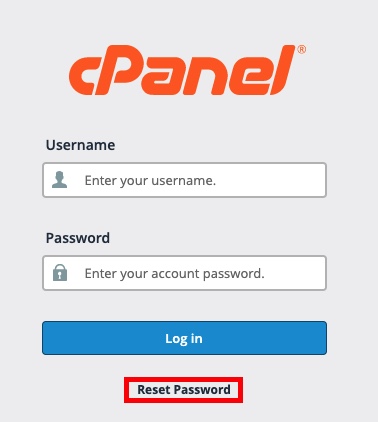
    • Open the login page. Navigate to your cPanel URL in a web browser
      (typically https://yourdomain.com:2083 or https://yourdomain.com/cpanel).
      cpanel login
    • Click Reset Password. Select the Reset Password link located just below the main Log in button.

    • Enter your username. Type your cPanel account username (not your email address)
      into the field and click Reset Password.
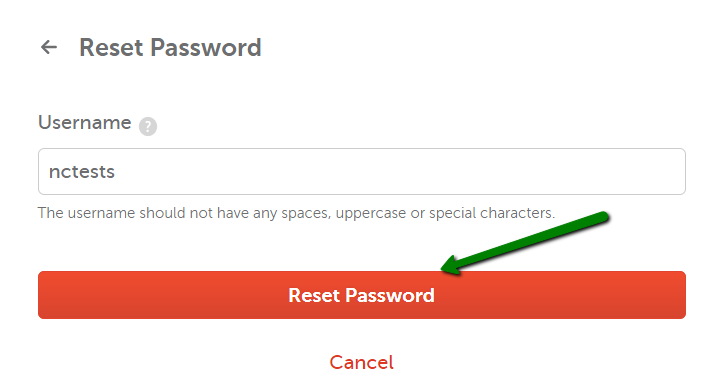
      cpanel

    • Verify your contact email. Enter the registered contact email address
      associated with the cPanel account—using the partial email hint if shown—and click Send Security Code.
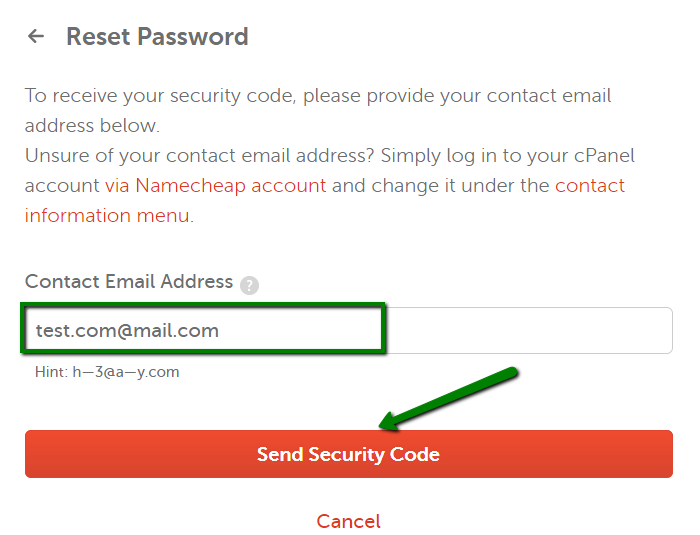
      cpanel reset

    • Keep the browser tab open. Do not close or refresh the current window while checking your inbox,
      as the security code is tied to that exact browser session.

    • Submit the security code.
      Copy the verification code from your email, paste it into the Security Code field
      on the cPanel screen, and click Submit.

    • Create a new password. Enter and confirm your new strong password,
      click Set Password, and select Log in to cPanel on the confirmation screen.

    Was this answer helpful?

    0 Users Found This Useful (0 Votes)

    Related Articles

    Most Popular Articles

    How to Change the PHP Version on Your Domain in cPanel

    Some software requires a different version of PHP. You can switch the PHP versions using cPanel....

    How to Reset the PHP Version to the Default Version in cPanel

    If you want to reset the PHP version to the default version, follow these instructions:1. Log in...

    How to Set the PHP Version per Domain in cPanel

    In this article, we will demonstrate how to use cPanel to set different PHP versions for...

    How to Set the PHP Version per Directory in cPanel

    Do you want to use different PHP versions per directory? You can do this using cPanel and the dot...

    How to Edit or Remove a Record in cPanel

    You can edit or remove a Record in cPanel using the cPanel's DNS Zone Editor. It allows you to...

    Tronadian Web Hosting logo Tronadian Web Hosting logo

    contact@tronadian.ca
    Product
    • Web Hosting
    • WordPress Hosting
    Domains
    • Domain Checker
    • Transfer Domain
    Services
    • SSL Certificates
    • Professional Email
    • Website Security
    • SEO Tools
    Legal
    • Privacy Policy
    • Terms Of Service
    • Acceptable Usage Policy
    • Contact Us
    Copyright © 2026 Tronadian Web Hosting. All Rights Reserved.
    FraudLabs Pro Prevents Fraud for Digital Businesses Payments
    Loading...
    Loading...
    Choose language
    العربية
    Azerbaijani
    Català
    中文
    Hrvatski
    Čeština
    Dansk
    Nederlands
    English
    Estonian
    Persian
    Français
    Deutsch
    עברית
    Magyar
    Italiano
    Macedonian
    Norwegian
    Português
    Português
    Română
    Русский
    Español
    Svenska
    Türkçe
    Українська

    Choose Currency

    $ CAD
    $ USD

    Generate Password

    Enter a number between 12 and 64 for the password length.

    We use cookies to improve your browsing and support experience. By continuing, you agree to our Privacy Policy.