Tronadian Web Hosting logo Tronadian Web Hosting Tronadian Web Hosting logo Tronadian Web Hosting
News:
Automatic Daily Backups New Feature - SiteJet Builder
CAD
  • CAD
  • USD
  • 0
    Account
    ExtendReduce
    Home
    Domains
    Register a New Domain Transfer a Domain My Domains
    Store
    Browse All ----- Shared Hosting WordPress Hosting SSL Certificates SEO Tools Website Security Site & Server Monitoring Professional Email ----- Register a New Domain Transfer Domains to Us
    Announcements Knowledgebase Network Status Contact Us Articles
    Client Login
    Knowledgebase
    1. Portal Home
    2. Knowledgebase
    3. Plesk
    4. CloudLinux (Plesk)
    5. How to Enable the Mailparse Extension of PHP Using CloudLinux Selector in Plesk
    Categories
    • SLA & Legal Policies
      2
    • Backup/Restore
      5
    • CloudLinux (cPanel)
      10
    • cPanel - Control Panel
      24
    • Databases
      11
    • DirectAdmin
      48
    • DNS - Nameservers
      6
    • Domain Management
      10
    • Email
      17
    • FAQ
      7
    • FTP
      9
    • Installing a Control Panel
      5
    • Mail Filters & SPAM
      8
    • Mobile
      11
    • Others
      3
    • PayPal
      7
    • Plesk
      47
    • Security
      10
    • SiteJet
      1
    • SiteWorx/InterWorx
      58
    • Softaculous
      69
    • SolusVM 2
      16
    • SSL
      4
    • Virtualizor
      19
    • WHM
      18
    • WordPress
      17
    Tag Cloud
    Support
    • My Support Tickets
    • Announcements
    • Knowledgebase
    • Downloads
    • Network Status
    • Open Ticket
    How to Enable the Mailparse Extension of PHP Using CloudLinux Selector in Plesk
    Print

    You can use CloudLinux Selector to enable the Mailparse extension in PHP via Plesk.


    1. Log in to your Plesk account.


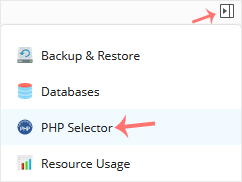
    2. In the right-hand sidebar, click on PHP Selector.
    plesk-cl-php-selector-menu.gif


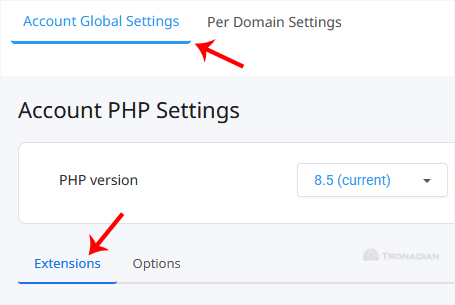
    3. Under the Account Global Settings, go to the Extensions tab.
    cl-account-global-settings-ext-tab.gif

    Note: If it shows an error related to the Native PHP version, change to a non-Native PHP version first.


    4. Checkmark the Mailparse. Once enabled, it will display a success message.

    cl-mailparse-enable.gif


    The message will read that the module Mailparse is saved.


    Note: This tutorial covers enabling the Mailparse extension on all domains. To enable it for an individual domain, go to Per Domain Settings, click on the Per Domain option, and then select Mailparse for the domain you wish to enable it on.


    The Mailparse extension has been successfully enabled via CloudLinux Selector in Plesk.

    Was this answer helpful?

    0 Users Found This Useful (0 Votes)

    Related Articles

    Most Popular Articles

    How to Change the PHP Version via CloudLinux Selector in Plesk

    You can use CloudLinux's Select PHP Version to change your website's PHP Version. CloudLinux...

    How to Enable ionCube Loader Using CloudLinux Selector in Plesk

    You can use CloudLinux Selector to enable ionCube Loader in Plesk.   1. Log in to your Plesk...

    How to Enable the GD Extension of PHP Using CloudLinux Selector in Plesk

    You can use CloudLinux Selector to enable GD extension in PHP via Plesk.   1. Log in to your...

    How to Enable or Disable PHP Extensions Using the CloudLinux Selector in Plesk

    You can use CloudLinux Selector to enable or disable available PHP extensions in Plesk.   1....

    How to Enable or Disable PHP's allow_url_fopen Using CloudLinux Selector in Plesk

    You can use CloudLinux Selector to enable or disable the allow_url_fopen directive in Plesk....

    Tronadian Web Hosting logo Tronadian Web Hosting logo

    contact@tronadian.ca
    Product
    • Web Hosting
    • WordPress Hosting
    Domains
    • Domain Checker
    • Transfer Domain
    Services
    • SSL Certificates
    • Professional Email
    • Website Security
    • SEO Tools
    Legal
    • Privacy Policy
    • Terms Of Service
    • Acceptable Usage Policy
    • Contact Us
    • Articles
    Copyright © 2026 Tronadian Web Hosting. All Rights Reserved.
    FraudLabs Pro Prevents Fraud for Digital Businesses Payments
    Loading...
    Loading...
    Choose language
    العربية
    Azerbaijani
    Català
    中文
    Hrvatski
    Čeština
    Dansk
    Nederlands
    English
    Estonian
    Persian
    Français
    Deutsch
    עברית
    Magyar
    Italiano
    Macedonian
    Norwegian
    Português
    Português
    Română
    Русский
    Español
    Svenska
    Türkçe
    Українська

    Choose Currency

    $ CAD
    $ USD

    Generate Password

    Please enter a number between 8 and 64 for the password length

    We use cookies to improve your browsing and support experience. By continuing, you agree to our Privacy Policy.