Tronadian Web Hosting logo Tronadian Web Hosting Tronadian Web Hosting logo Tronadian Web Hosting
News:
Automatic Daily Backups New Feature - SiteJet Builder
CAD
  • CAD
  • USD
  • 0
    Account
    ExtendReduce
    Home
    Domains
    Register a New Domain Transfer a Domain My Domains
    Store
    Browse All ----- Shared Hosting WordPress Hosting SSL Certificates SEO Tools Website Security Site & Server Monitoring Professional Email ----- Register a New Domain Transfer Domains to Us
    Announcements Knowledgebase Network Status Contact Us Articles
    Client Login
    Knowledgebase
    1. Portal Home
    2. Knowledgebase
    3. WHM
    4. WHM (For Resellers)
    5. How to Create a New Account in WHM
    Categories
    • SLA & Legal Policies
      2
    • Backup/Restore
      5
    • CloudLinux (cPanel)
      10
    • cPanel - Control Panel
      24
    • Databases
      11
    • DirectAdmin
      48
    • DNS - Nameservers
      6
    • Domain Management
      10
    • Email
      17
    • FAQ
      7
    • FTP
      9
    • Installing a Control Panel
      5
    • Mail Filters & SPAM
      8
    • Mobile
      11
    • Others
      3
    • PayPal
      7
    • Plesk
      47
    • Security
      10
    • SiteJet
      1
    • SiteWorx/InterWorx
      58
    • Softaculous
      69
    • SolusVM 2
      16
    • SSL
      4
    • Virtualizor
      19
    • WHM
      18
    • WordPress
      17
    Tag Cloud
    Support
    • My Support Tickets
    • Announcements
    • Knowledgebase
    • Downloads
    • Network Status
    • Open Ticket
    How to Create a New Account in WHM
    Print

    To create a cPanel account, you need to create at least one hosting package. In WHM, you can easily create hosting packages.


    1. Log in to your WHM Account.


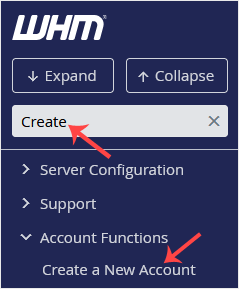
    2. Go to Account Functions >> Create a New Account or type Create in the menu filter box. The option will appear. Click on it.
    whm-reseller-create-a-newaccount-sidebar.gif


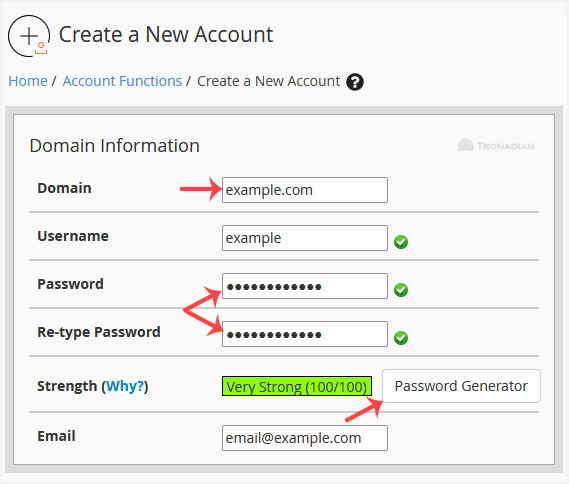
    3. Enter the following details under Domain Information:

    • Domain: The domain name you want to host, such as example.com.
    • Username: Click anywhere on the blank area, and this field will be filled in automatically. You can also enter any other username you want to use.
    • Password: Enter a password or use a password generator. Copy the password to a safe place. You will need it to access your newly-created account.
    • Email: Your email address.

    whm-reseller-create-account-domaininfo.gif


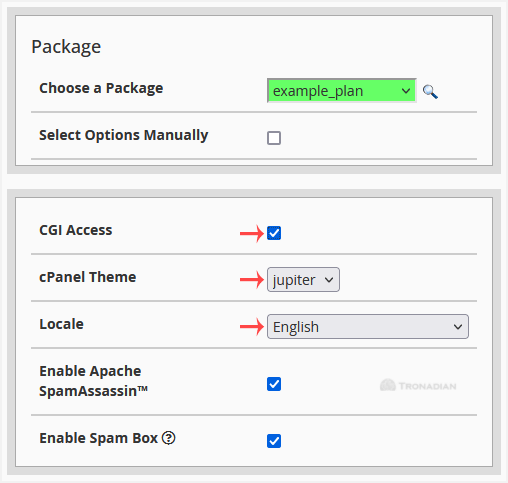
    4. Under Package:

    • Choose a Package: You can choose a package from the drop-down menu. If there isn't an available one, you can create it from the Add a Package option.
    • CGI Access: Tick this to enable CGI Access.
    • cPanel Theme: You can leave it as it is or choose a theme you want to use for your cPanel user account.
    • Locale: Select a language for your cPanel user account.
    whm-reseller-create-account-settings.gif


    5. Under Reseller Settings:

    • Make the account a reseller: Leave it unchecked if you do not want to grant reseller access to your cPanel account. This option is only available for root users.


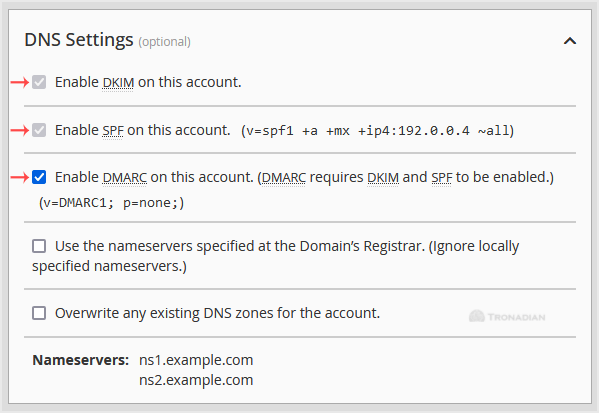
    6. Under DNS Settings:

    • Enable DKIM on this account: It is enabled by default. We recommend you to keep it enabled.
    • Enable SPF on this account: Check this option to prevent abusers from sending spoof emails on behalf of your domain name.
    • Enable DMARC: Enabled by default, and it requires DKIM and SPF to be enabled. If you disable DMARC, you can also disable DKIM and SPF.
    whm-reseller-create-account-dnssetting.gif


    7. Leave all other options as they are. Please, scroll down to the Create button and click it.
    create-cp-account.gif


    Your cPanel account will be created successfully.



    Was this answer helpful?

    0 Users Found This Useful (0 Votes)

    Related Articles

    Most Popular Articles

    How to Set Custom/Private Nameservers in WHM

    You can set up custom/private nameservers from WHM. 1. Log in to WHM Account. 2. Go to Server...

    How to Create/Add a Package in the WHM

    You can create predefined packages in the WHM for automation or another purpose.1. Log in to your...

    How to Edit a Hosting Package in WHM

    You can edit the hosting package of your account. With root access, you can edit the packages of...

    How to Create a Feature List in WHM

    You can create a feature list from your WHM Account. Feature lists allow you to provide a...

    How to Remove a Feature List from WHM

    Follow this tutorial if you have a feature list you don't need and want it removed. 1. Log in to...

    Tronadian Web Hosting logo Tronadian Web Hosting logo

    contact@tronadian.ca
    Product
    • Web Hosting
    • WordPress Hosting
    Domains
    • Domain Checker
    • Transfer Domain
    Services
    • SSL Certificates
    • Professional Email
    • Website Security
    • SEO Tools
    Legal
    • Privacy Policy
    • Terms Of Service
    • Acceptable Usage Policy
    • Contact Us
    • Articles
    Copyright © 2026 Tronadian Web Hosting. All Rights Reserved.
    FraudLabs Pro Prevents Fraud for Digital Businesses Payments
    Loading...
    Loading...
    Choose language
    العربية
    Azerbaijani
    Català
    中文
    Hrvatski
    Čeština
    Dansk
    Nederlands
    English
    Estonian
    Persian
    Français
    Deutsch
    עברית
    Magyar
    Italiano
    Macedonian
    Norwegian
    Português
    Português
    Română
    Русский
    Español
    Svenska
    Türkçe
    Українська

    Choose Currency

    $ CAD
    $ USD

    Generate Password

    Please enter a number between 8 and 64 for the password length

    We use cookies to improve your browsing and support experience. By continuing, you agree to our Privacy Policy.